
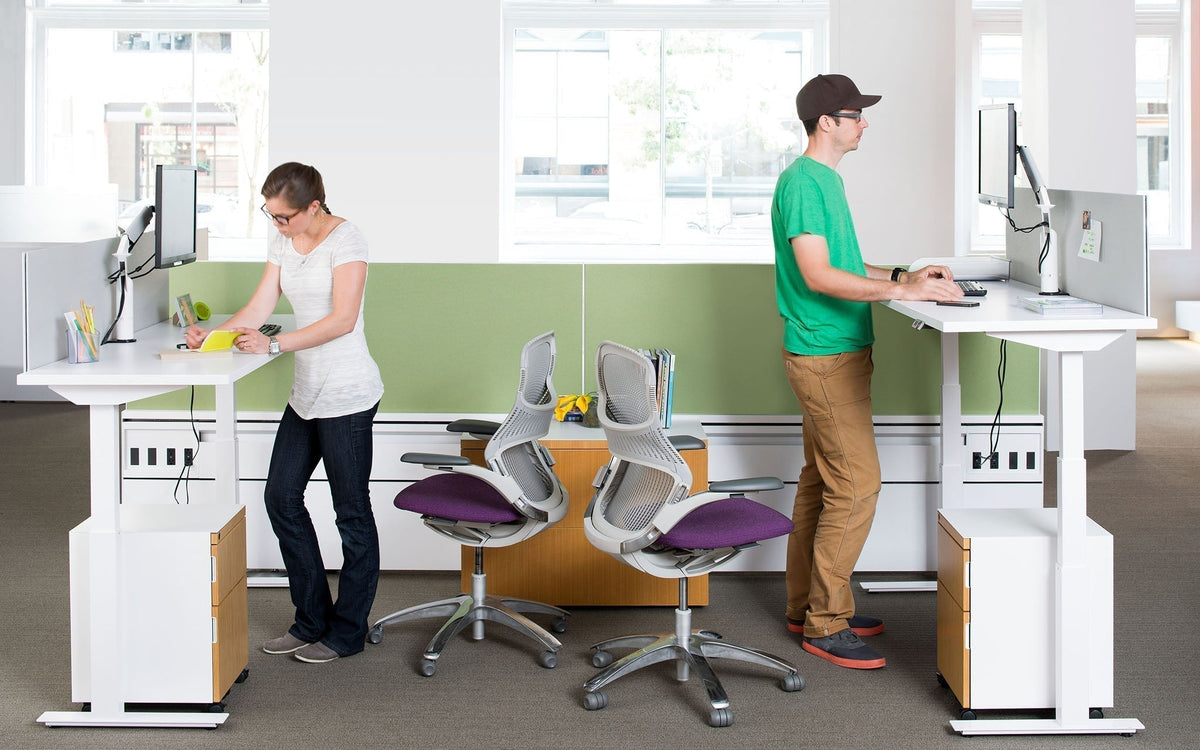
This post brings together everything we previously covered across separate articles on why sit-stand desks are trending, how to switch to one comfortably, and the business case for height-adjustable desks, so you have the full picture in one place.
If you've been delaying getting a standing desk because you're unsure whether it's worthwhile, or if you've already bought one but aren't sure how to use it correctly, this guide covers both. We'll look at the benefits NZ workplaces are seeing from sit-stand desks, examine what the research says about their health benefits, consider how long you should stand when using a standing desk, and help you decide between a manual and an electric desk.
What is the 20-8-2 rule for standing desks? The 20-8-2 rule is a simple posture guideline: for every 30 minutes at your desk, sit for about 20 minutes, stand for 8 minutes, and move around for 2 minutes. For someone new to a sit-stand desk, it’s a practical starting point, not a strict standing target to hit every day.
Sit Stand Desk Benefits NZ Workers Should Know: Switching From Sitting to Standing at Work
Switching from sitting to standing at work isn't about chasing a trend; it's a small, repeatable habit change with genuine, well-documented upside. NZ workplaces increasingly build sit-stand desk benefits around one core idea: the health benefits are real, but they come from alternating, not from standing all day.
The benefits are simple: less time in one position, better blood flow, less fatigue (we’re all familiar with the 2-3 PM slump), and a lot less lower-back stiffness from sitting still for hours.
Why Are Sit-Stand Desks Becoming Popular in NZ Offices?
We're often asked why sit-stand desks are becoming popular in NZ offices right now, and the honest answer is a mix of hybrid work and a genuine shift in workplace health expectations. Sit-stand desks stopped being a novelty item a while ago. What's changed since is the context around them.
As part of the wider sit-stand desk trend NZ workplaces have been part of, hybrid work means fewer people are at a single desk all day, every day, which has pushed more businesses towards a proper hybrid work desk setup built around shared height-adjustable desks that suit whoever's using them that day. At the same time, workplace wellbeing policies have shifted from "nice to have" to something HR and health and safety teams are actively expected to address, and desk ergonomics is one of the simplest, most visible ways to do that.
This has happened in New Zealand offices, which have provided a hybrid floor featuring an electric standing desk since people no longer own fixed desks. The desk has to be set for the person currently sitting there, and an electric sit-stand desk can do this in seconds instead of requiring a manual adjustment each time someone sits down.
Here's a practical example of how this works in real life…
Suppose a professional services firm based in Wellington decides to adopt a three-day-a-week hybrid working arrangement. Since the employees rotate through the office and don't have a fixed desk, the company replaces the usual fixed desks with electric height-adjustable ones such as the Enhance Electric Height Adjustable Desk or the Summit II Single Height Adjustable Desk. The person who turns up that day simply selects the height setting they have saved and can begin working within seconds, whether they are six-foot-four or prefer to work standing after lunch, and the desks never become a bottleneck in the schedule. It's a minor furniture choice that quietly resolves a hybrid working problem which most offices only realise when they have outgrown it.
If you are planning a similar change, our team can provide a quote for an entire floor's worth of desks rather than dealing with one desk at a time.

→Shop: Mobel Enhance Electric Height Adjustable Corner Desk
Is Standing All Day Actually Better Than Sitting?
No, and it's important to be clear about this. The purpose of a sit-stand desk is not to stand all day instead of sitting all day; it's to avoid sitting or standing for hours without a break.
Although prolonged sitting is associated with lower back pain, poor circulation, and general fatigue, continuous standing for long periods also has its own issues, such as discomfort in the legs and feet.
The true advantage is obtained by taking turns between the two positions, not by replacing one extreme with the other.
Do Standing Desks Really Help Back Pain?
Absolutely, it’s been known to help a heap of people. Think about it: switching between sitting and standing relieves that constant pressure on your lower back. It keeps you moving in small, natural ways throughout the day instead of locking you into one rigid position for hours.
It's not a wonder cure for chronic back problems, so if you're suffering from ongoing pain, you should definitely see a doctor or a physical therapist rather than hoping that some furniture will fix it. But as a good habit for preventing aches before they occur, a sit-stand desk is easily one of the most proven improvements you can make to your workspace.
How to Switch to a Standing Desk Without Hurting Your Back
This is where most people go wrong. They get a new desk, stand for four hours on day one, and decide standing desks "don't work for them." The standing desk transition tips below cover a better way to ease in:
Step 1: Build up standing time gradually. Start with 20 to 30 minutes of standing at a time, following the 20-8-2 rhythm above, rather than committing to hours on your first day.
Step 2: Get your footwear and mat sorted. Standing on a hard floor in unsupportive shoes is the fastest way to make standing uncomfortable. A good anti-fatigue mat makes a real difference, and a proper standing desk mat cushions your feet and encourages the small postural shifts your body naturally wants to make while standing.
Step 3: Set your monitor height correctly. Your screen should be at eye level when you’re sitting or standing, so you’re not looking up or down. If you use a converter or an electric desk, adjust the desk when changing positions, and adjust the screen as well.
Step 4: Carry out regular posture checks. Every 20 to 30 minutes, do a quick mental check to make sure your shoulders are relaxed, your weight is evenly distributed on both feet, and the screen is at eye level. This will stop bad habits from returning. Additionally, some people find that an anti-fatigue wobble board helps because it naturally promotes small shifts in weight while standing, rather than keeping your legs in a single static position.
How long does it take to adjust to a standing desk? Most people feel comfortable within one to two weeks as they gradually build up their standing time. So if you're wondering how long to get used to a standing desk before it feels normal, two weeks of gradual building is a realistic target. If you jump straight to standing for hours on day one, expect sore feet and legs, which is exactly why easing in with the steps above works better than diving in headfirst.
How long should you stay at a standing desk? Once you've got used to it, how long should you stay at a standing desk each day? Most workplace health advice suggests about one third of the day, in short periods rather than one long block, which matches the 20-8-2 rhythm mentioned above.
Thinking about making the switch?
Browse our Height Adjustable Desks collection to see the full electric range, or talk to our office design team if you'd like help planning height-adjustable desks across a whole floor or hybrid workspace.

→ Shop: Helsinki Height Adjustable Table
The Business Case: Reasons to Switch to a Height Adjustable Desk
Beyond individual comfort, there's a genuine business case for height-adjustable desks, particularly for growing or hybrid teams.
If you're weighing up the reasons to switch to a height-adjustable desk for your whole office rather than just your own setup, the height-adjustable desk benefits NZ businesses report tend to fall into three groups.
-
Better health and a reduction in absenteeism: During a working day, people experience fewer aches and less fatigue, leading to fewer sick days due to musculoskeletal discomfort, an outcome that is important at the team level as well as the individual level.
-
Productivity and energy: Changing your position between sitting and standing helps keep energy levels up and can help boost concentration throughout the day, especially during the mid-afternoon slump when the effects of remaining seated for long periods are most noticeable.
-
The desks are flexible and suitable for shared and hot-desk arrangements; this feature has changed the most since 2020. With a height-adjustable desk, the position can be reset to the new person's preferred height by pressing a button, something which is very important in an office that operates on a hot-desking or hybrid rostering system, unlike a fixed-height desk.
Manual vs Electric Height-Adjustable Desks: What's the Difference?
The main difference between manual and electric height-adjustable desks is that a manual desk uses a hand crank or lever to adjust its height, which is usually sufficient for a single user
On the other hand, an electric desk can be adjusted by pressing a button, remembers height settings for different users, and is much more suitable for shared or hot-desked workstations since no one person has to wind the desk up or down for another manually.
When choosing between an electric desk and a fixed-height desk, the electric model offers the flexibility of a standard fixed desk plus the ability to adjust height at any time.
|
Manual Height-Adjustable Desk |
Electric Height-Adjustable Desk |
|
|
Adjustment method |
Hand crank or lever |
Push-button motor |
|
Speed to adjust |
Slower, some physical effort |
Fast, minimal effort |
|
Best for |
One consistent user |
Shared desks, hot-desking, hybrid teams |
|
Memory presets |
No |
Yes, on most models |
|
Upfront cost |
Lower |
Higher |
If your desk has one dedicated owner and budget is the main factor, a manual desk still does the job. If your desk is shared between multiple people or used across a hybrid roster, the electric option earns its higher price back quickly in convenience alone.
Are Height-Adjustable Desks Worth the Extra Cost?
For the majority of offices, yes, especially when you take into account the shared use, the benefits for staff wellbeing, and the fact that a good height-adjustable desk is a long-term asset, not something that is consumed.
Although the initial cost is more than that of a fixed desk, the flexibility, particularly in the case of shared or hybrid workstations, usually makes it worthwhile over the lifetime of the desk.
The Bottom Line
A sit-stand desk isn't simply about standing more; it's about making sure that your body changes position regularly during the day. If you're new to standing behind a desk, start gradually, get a mat, and set your monitor at the right height; if the desk is shared or your team works in a hybrid arrangement, an electric height-adjustable desk is the perfect choice.
Ready to make the switch?
Browse our full Height Adjustable Desks collection, including the Rise Electric Height Adjustable Straight Desk, the Enhance Electric Height Adjustable Corner Desk, and the Enhance Electric Height Adjustable Shared Desk for hot-desked teams. Easing into standing for the first time? Pair your desk with the Arise Standsoft Anti-Fatigue Mat.
Get in touch with our team for a quote, or to talk through the right setup for your office.
Frequently Asked Questions
-
What is the 20-8-2 rule for standing desks?
The 20-8-2 rule suggests spending roughly 20 minutes sitting, 8 minutes standing, and 2 minutes moving around for every half an hour spent behind your desk. It's a simple, practical starting point, not a strict standing quota.
-
How often should I sit and stand at my desk?
It’s suggested to change position every 20 to 30 minutes rather than sitting or standing for hours at a time. The exact ratio matters less than making sure you don't stay in one position for extended periods.
-
How long does it take to adjust to a standing desk?
Most people feel comfortable within one to two weeks if they gradually build up standing time. Jumping straight into hours of standing on day one is the most common reason people find sit-stand desks uncomfortable at first.
-
What's the difference between a manual desk and an electric height-adjustable desk?
A manual desk adjusts via a hand crank or lever, which suits one consistent user. An electric desk adjusts at the push of a button, and often stores height presets, making it far better suited to shared or hot-desked workstations.
-
Can I add a standing desk converter instead of buying a new desk?
Yes. A standing desk converter sits on top of your existing desk and raises your monitor and keyboard to standing height, giving you the sitting-to-standing benefit without replacing your desk. It's a good option if you want to trial standing before committing to a full height-adjustable desk.
Related reading: 5 Benefits of Height Adjustable Desks, Health Benefits of Height-Adjustable Desks, and Standing or Sitting at Your Desk – Which is Healthier?
